Your inbox, reimaginedBETA
Less inbox.
More headspace.
Turn Gmail and Outlook into one clear brief. Know what needs you, reply in your own voice, and keep every promise in view.
No separate AI bill.
 Gmail
Gmail Outlook
 MiniBrief
A little clarity, every morning
Your morning, made lighter.
Need a reply
Due today
Open promises
Start here
Select a messageOne last look before launch
Maya has finished the homepage updates. She needs your approval by 2 PM to keep tomorrow’s launch on track.
Your next step
Review the homepage and confirm whether it is ready to launch.
Edit the words to make them yours. Choosing a tone starts a fresh sample draft.
3 open promises
Small commitments. All accounted for.
Send homepage feedback
Today, 2 PMMaya Chen ·Gmail
“I’ll get you my feedback this afternoon.”
Confirm the workshop scope
Today, 4 PMAlex Morgan ·Outlook
“Let me check the details and come back to you.”
Review customer research
TomorrowNina Patel ·Gmail
“I’ll add my questions before our planning session.”
Explore the demo. No inbox connection needed.
Made for work that runs on email.
Small professional-services teams
Client email is the work. Your morning Brief shows what needs a reply, and the Promise Ledger keeps what you told each client you'd do in view.
Brokers
Sender Guard checks each message for risk, including look-alike domains, so you can act on a request with more confidence, and the Promise Ledger keeps follow-ups from slipping.
Agencies
Bring Gmail and Outlook into one brief, get replies drafted for you to review, and keep every client promise in view.
What it does
One place to move your day forward.
A clearer view of your email, with the next step already in reach.
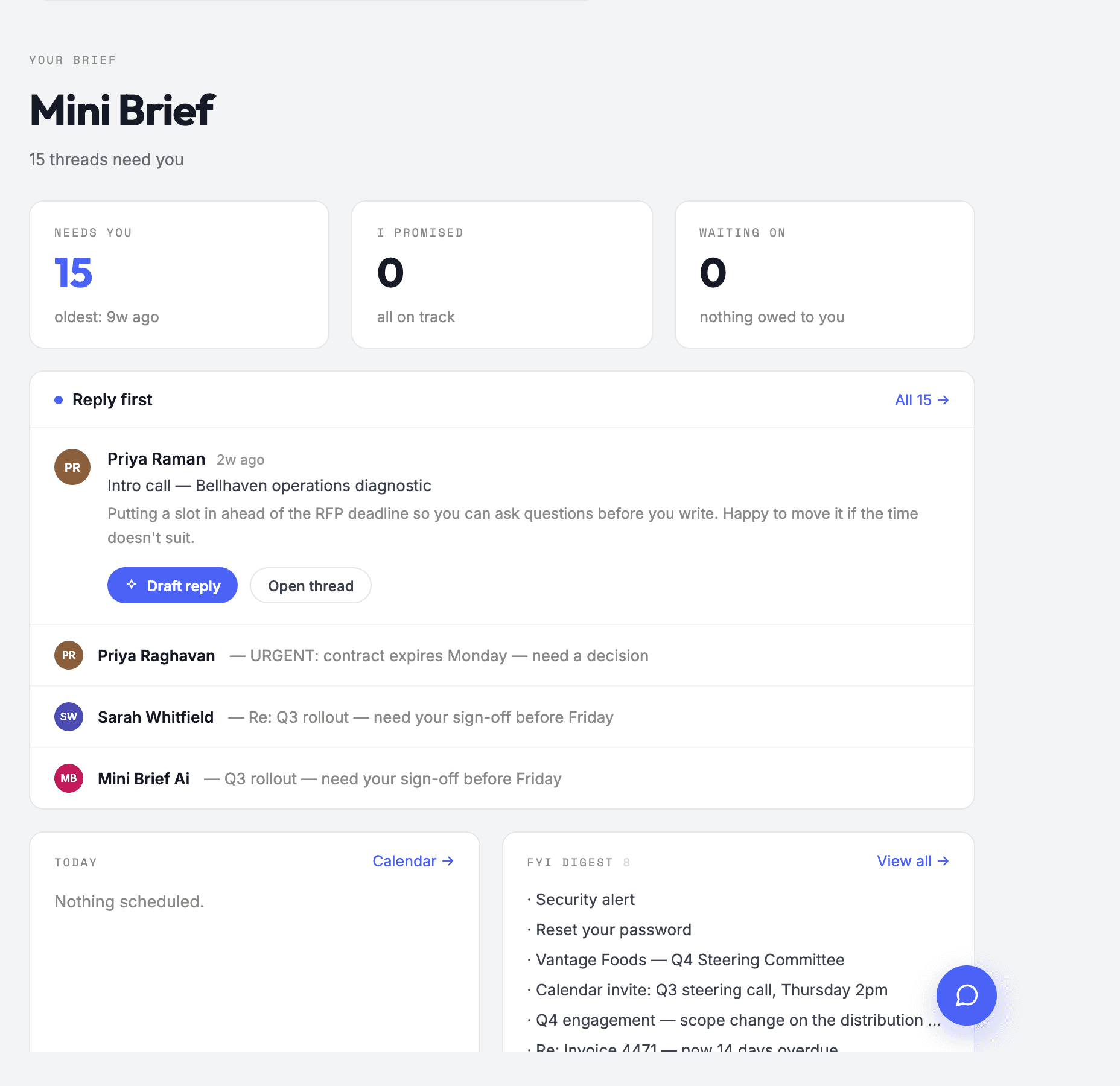
One brief, not a pile.
Open MiniBrief and get one ranked brief: what needs a reply, what's waiting on someone else, and what can wait. Long threads come with the key points and the next step already pulled out.
Try it in the demoAlso included: catch-up reports after time away, VIP alerts when someone important goes quiet, meeting prep from your calendar, a tone check before you send, and one-click unsubscribe.
How it works
Up and running in a few minutes.
Create your account
Sign up with your email. Every account starts with a trial.
Connect Gmail or Outlook
Sign in with Google or Microsoft. Work or school Outlook accounts usually need a one-time approval from a Microsoft 365 admin.
Open your brief
MiniBrief reads your inbox and hands you the first brief. Come back each morning, or whenever you need to know where things stand.
Private by design
Your email.
A smaller footprint.
Our server reads the mailboxes you connect to prepare your brief. It keeps a rolling 90 days of metadata. Message bodies are never stored on our servers.
- No invisible audience.
- No analytics, no telemetry, no tracking.
- Disconnect means delete.
- Disconnect a mailbox and everything read from it is deleted at once; delete your account and everything goes.
Your connected mailboxes
Only the Gmail and Outlook accounts you connect.
Read by the MiniBrief server
- Metadata
90 days
Rolling retention
Subjects, senders, previews, dates and what MiniBrief worked out about each message.
- Message bodies
Not stored
Fetched when you open
A message body is fetched from your mailbox when you open it, and is not kept on our servers.
AI requests go to Anthropic
Sorting sends a subject and about 120 preview characters. Full message text is sent only for features you use on a message you opened, capped in length.
One named provider. Anthropic's terms forbid training on your data.
Secure by construction.
These are not policies we promise to follow. They are how MiniBrief is built.
A risk verdict on every message.
Sender Guard judges each incoming message against a baseline built from your own mail: who writes to you, how often, and whether their mail passes authentication. A tier, the reasons and the evidence, and you can overturn any verdict.
Look-alike domains, caught on arrival.
A sender imitating a domain you correspond with is called out, and MiniBrief watches about 150 look-alikes of your own domain so mail from one that gets registered is high risk from its first message.
Links and attachments checked first.
For the messages a phish arrives as, links and attachments are judged on the server before you open the mail, and a high-risk finding is pushed to your browser within minutes.
A guard on Send.
A look-alike of a domain you write to, or bank details and credentials headed to an outside address, stop a send until you confirm. A normal reply adds no step.
A mailbox audit every six hours.
Filters that forward, delete or hide your mail are the classic sign of a compromised account. MiniBrief finds them in Gmail, tells you, and removes a bad one with one click.
Your domain's posture.
SPF, DKIM, DMARC and MTA-STS for your own domain, checked weekly straight from DNS, with the record to add for each gap where there is one.
Message bodies are not stored.
Our server keeps a rolling 90 days of subjects, senders and previews so your brief is ready when you open it. A message's body is fetched from your mailbox only when you open it, and is not kept.
A subject line and about 120 characters, by default.
That is all sorting sends to the AI. Full message text goes out only for the features you use on a message you opened, capped in length.
The AI sees only what a feature needs.
Both the web app and the background worker call Anthropic, scoped to the feature: a subject and short preview for sorting, and the opened message for features you use. Anthropic's terms forbid training on your data.
Mailbox grants are sealed at rest.
The OAuth grant that connects Gmail or Outlook is encrypted with AES-256-GCM before it is written, under a key that never lives in the database, and your browser never receives it.
Sign-in built to resist brute force.
Passwords are at least 12 characters, checked against leaked-password lists, and stored only as bcrypt hashes by our auth provider. Two-factor authentication is a switch away. Sign-in and code entry are rate-limited.
Short-lived access tokens.
Access tokens expire after an hour and refresh tokens rotate; signing out revokes every session and wipes the local cache. Session cookies are HttpOnly, Secure, and SameSite.
Every row is guarded in the database.
Access control runs as PostgreSQL row-level security on every table, below the API, so the database itself decides what each signed-in user can see. No staff tool reads mail rows.
Card details never touch us.
Card details are entered on Stripe's own checkout page, a PCI-DSS Level 1 provider, and never reach MiniBrief.
Also:
- TLS 1.2 or better on every connection
- A Content Security Policy that forbids embedding MiniBrief in another site
- Only the OAuth scopes a feature needs, with access you can revoke at any time
- Dependencies audited for known vulnerabilities
- Secrets kept in a secrets store, never in the app
- Auto-quarantine of high-risk mail, if you switch it on
Why MiniBrief
Built around your day.
And your boundaries.
A useful assistant should fit the way you work. That means a clearer view of your inbox, a little less to remember, and control over what you share.
One brief. Both inboxes.
Gmail and Outlook, side by side. MiniBrief brings your connected mailboxes into one brief, so you have one place to start.
Your work, brought together
Your voice, when you choose.
Drafts can learn from your own sent mail when you turn it on. A head start on the reply, with the words still yours to review.
Personalization is your call
Keep both sides of a promise.
The Promise Ledger tracks what you owe and what you’re waiting on. Commitments in both directions, kept in view.
Follow through with less effort
Less context, by default.
Sorting sends a subject line and about 120 preview characters to the AI. Full text is sent only for features you use on an opened message, capped in length.
A deliberate limit on data
A few good questions
Questions, answered straight.
The practical details, before you bring your inbox along.
Read about your dataDo you store or read my email?
Our server reads the mailboxes you connect so your brief is ready whenever you open it. It keeps a rolling 90 days of metadata: subjects, senders, previews, dates and what MiniBrief worked out about each message. Message bodies are not stored; one is fetched from your mailbox when you open it. The AI sees a subject and a short preview per message for sorting, which runs in the background, and the message you opened for the features you use on it; some results, like your daily Brief, are kept so you can read them back. The Privacy page lists exactly what. The full picture is on the Security page.
Does it work on my phone?
MiniBrief is a web app, so there is nothing to install and it opens in any modern browser. It's designed for the desktop browser first.
Can my team use it on shared inboxes?
Not yet. Today MiniBrief connects the Gmail and Outlook mailboxes you sign into yourself and builds one brief across all of them; a team edition with shared mailboxes is planned.
Why not just use Gemini or Copilot?
They're useful assistants inside Gmail and Outlook. MiniBrief gives you one daily brief across all your mailboxes, tracks who's waiting on you, and flags risky email. Read the full comparison
What does it cost?
Every account starts with a trial. After that, one paid plan unlocks everything. Email michael@minibrief.app and we'll walk you through it.
Do I need my own AI key?
No. The AI is built in. There is no key to manage and no separate AI bill.
Does it work with both Gmail and Outlook?
Yes. Connect Gmail and Outlook mailboxes, including work Microsoft 365 accounts, and MiniBrief builds one brief across all of them. See the guide to one daily brief.
What if my work Outlook needs IT approval?
Some Microsoft 365 organisations require an administrator to approve new apps. MiniBrief gives you a ready-to-send message for your IT admin. See the admin approval guide.
What if MiniBrief puts an email in the wrong place?
Correct it in one tap and MiniBrief learns that sender for next time. You can see and undo what it learned in Settings. Add the people you can't miss to Never miss and they're pinned to the top of your brief. See the morning brief guide.
Will it send email without me?
No. MiniBrief drafts replies for you to review, and nothing is sent until you press Send. If a draft needs a detail it couldn't know, it leaves a [[fill: …]] marker and won't send until you fill it in.
How does it keep track of what I promised?
MiniBrief finds promises in your email, both ways, and lists them in Open Loops as I owe and Owed to me. Done, snooze and due dates sync across your devices. See how open loops stay in sync.
Does it warn me about phishing?
Yes. MiniBrief gives each incoming message a risk rating and checks links and attachments before you open the message, in Gmail and Outlook. High-risk mail is flagged before you act on it. See the phishing guide.
Good mornings start here
Make room for the work that matters.
MiniBrief is in beta for Gmail and Outlook. Create an account, connect a mailbox, and your first brief is minutes away.
Get startedGmail & Outlook. One clear brief.